13. Customize an app with Appage
00:00 next step is to enhance the Appage based on which the app is running
00:04 so go to "Appage"
00:06 suppose we've got thorough understanding of the app..
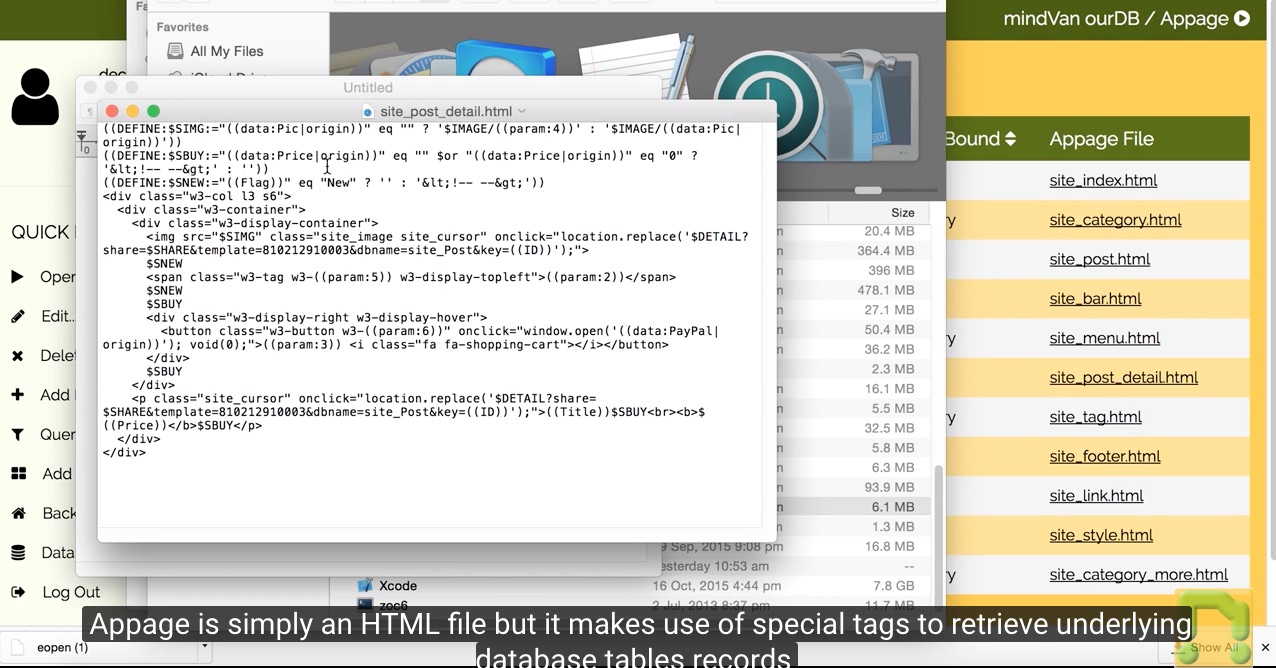
00:09 and know that the "Appage" "site_post_detail.html" is the file controlling how the products/services prices are displayed
00:13 click the file to download it
00:23 we may change the file name back to original one
00:36 and open the file with a text editor
01:00 Appage is simply an HTML file but it makes use of special tags to retrieve underlying database tables records
01:06 here we locate the position where we should put the new information
01:15 save the file..
01:25 and edit the corresponding Appage record by uploading the HTML file
01:58 now go back to home workspace..
02:03 and reload the app again
02:10 we can see the presentation of the products/services prices has been changed
02:20 not only that on the app home page is changed..
02:23 but also those in the other pages with the prices have been changed too
02:33 and this is the power of Appage - one of the technologies ourDB features